如何制作 AI 宝宝视频
先选好制作方式,准备清晰的照片或简短提示词,再设置画面比例并生成。按步骤完成一次后,可以参考下方案例调整自己的作品。
先确定结果:创建新宝宝角色、让已有照片动起来,还是让宝宝说一句话。前两种使用宝宝视频;需要指定语音录音时,应选择宝宝说话或播客流程。
打开工具快速步骤
从准备素材到检查结果,按顺序完成。
- 1打开宝宝视频工具。
- 2选择“图生视频”让照片动起来,或选择“文生视频”根据文字描述创建场景。
- 3使用照片时,上传图片并描述一个动作;使用文字时,说明宝宝、场景、动作和镜头方式。
- 4设置画面比例,例如 TikTok 或 Shorts 使用 9:16。先从 5 秒短片开始。
- 5查看当前设置和预计积分,生成后播放完整视频,检查面部、手部和动作。
- 6从“我的作品”下载已完成的视频。需要字幕或多镜头剪辑时,再用视频编辑器处理。
- 比例、时长、分辨率和音频支持因模型而异。选定模型后,请检查当前控件和预计积分。
选择合适的起点
- 创建虚构宝宝场景
- 没有原图时选择文生视频,描述一个宝宝、一个环境和一个动作。不同次生成的人脸可能变化;后续需要相同起始角色时,可保存静态图,再作为图片输入。
- 让宝宝照片动起来
- 照片已有想要的面部、衣服和场景时,选择图生视频。集中描述动作,不要重新设计整张图。原图会引导外观,但无法保证每一帧完全保留细节。
- 让宝宝说话
- 在宝宝说话或宝宝播客中,将照片与录制或上传的音频配合使用。普通视频里的微笑或动嘴,不代表已经与脚本准确对口型。
按动作准备照片构图
花积分前先选好裁剪,脸部特写和全身场景给模型的信息不同。
- 眨眼或微笑
- 保留清楚的一张脸、完整头部和部分肩膀,避免奶嘴、手遮嘴、重滤镜,以及从额头处截断的照片。
- 挥手
- 露出肩膀、手臂和手,在身体旁留空。只有脸部特写时,模型需要自行补出缺失手臂。
- 朝镜头移动
- 采用更宽的构图,露出身体及下方地面,在移动方向留空。比起人像动画,这类镜头更需要仔细检查手、腿及与地面的接触。
- 选择输出形状
- 竖屏发布时,尽量准备竖屏照片。检查编辑器如何使用所选比例;方图变成 9:16 可能裁剪或补出内容。给字幕留空间,但不要挡脸。
写出能够具体检查的提示词
第一次使用一个主要动作和简单镜头要求。下面是起始提示词,不是新生成结果的记录。
避免在一个短片里同时要求“走路、转身、拍手、大笑和跳舞”。较长故事应拆成几个简单镜头,再剪辑组合。提示词中的“4K”或“10 秒”不能代替实际分辨率和时长控件。
照片 → 轻微表情
宝宝轻轻微笑并眨一次眼,头部基本保持不动。衣服和背景保持一致,镜头固定。
照片提供角色与场景。先用这个版本判断面部是否稳定,再添加挥手或镜头运动。
文字 → 新场景
一个穿浅黄色连体衣的宝宝坐在窗边的爬行垫上,抬起一只手轻轻挥动。柔和日光,中景,镜头固定。
这段明确了主体、环境、动作和构图。如果手部出问题,先在同一场景中改成微笑,不要同时更换衣服、镜头和动作。
设置一次小测试
- 模型与时长
- 先选输入方式,再选支持该方式的模型。当前默认 Vidu Q3 Turbo 为 5 秒、540p,其他模型选项不同。切换模型后重新检查时长、分辨率、比例和积分。
- 分辨率
- 先用短时长、较低分辨率草稿判断动作,再决定是否制作更长或更大版本。更大输出不能修复模糊人脸或被裁掉的手。
- 声音
- 检查所选模型是否显示音频选项,下载前先试听结果。在提示词中要求笑声或对白,不保证声音及准确台词符合预期。
教程案例:素材、提示词与参数
对照案例、可用输入素材和已记录的设置。
写实宝宝视频:文字生成视频
文字生成案例适合参考场景和动作的描述方法。照片动画案例则应对照可用原图,观看完整视频。部分历史案例没有保留原图或完整参数,请以当前编辑器选项为准,并自行检查生成结果。
提示词要点
温暖清晨的舒适婴儿房里,一个 9 个月大的宝宝坐在柔软的床上,自然微笑、眨眼,向镜头轻轻挥手。阳光穿过纱帘,梦幻散景、浅景深,手持镜头缓慢推进,柔和粉彩色调,电影感、超写实,4K 分辨率,每秒 24 帧,片段长 5 秒。
查看原始提示词(英文)
A warm morning in a cozy nursery, a 9-month-old baby sitting on a soft bed, natural smile, blinking and gently waving at the camera, sun rays filtering through sheer curtains, dreamy bokeh, shallow depth of field, handheld slow push-in shot, soft pastel colors, cinematic, ultra-realistic, 4K resolution, 24 frames per second, 5-second clip.
- 这个案例能参考什么
- 婴儿房提示词在没有原图的情况下描述了宝宝、窗光和镜头方向。应全程比较面部和举起的手,不只看第一帧。
- 以实际文件为准,区分提示词要求
- 历史提示词要求 4K、5 秒,但展示文件实际为 1272 × 720、约 10 秒。请通过当前控件设置自己的输出,提示词不能当作已验证的参数记录。
让宝宝照片动起来:照片转视频
文字生成案例适合参考场景和动作的描述方法。照片动画案例则应对照可用原图,观看完整视频。部分历史案例没有保留原图或完整参数,请以当前编辑器选项为准,并自行检查生成结果。
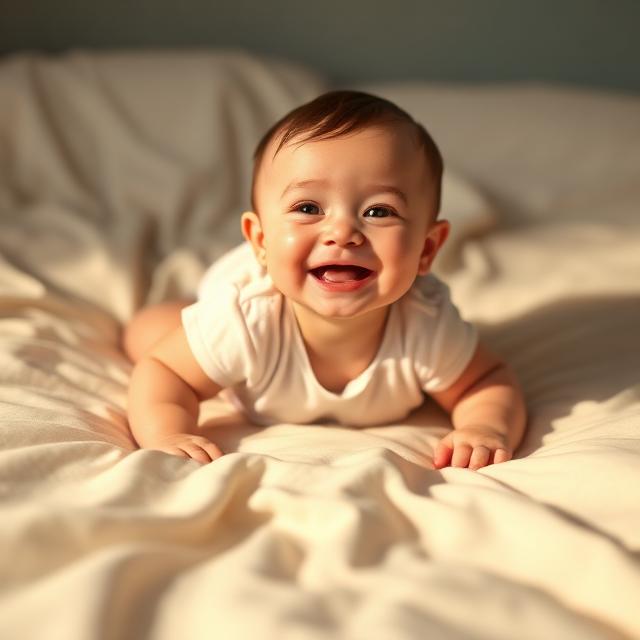
- 与原图比较
- 输入是躺在床上微笑的宝宝。观察身体相对床品向前移动的情况,并对照原图检查头发、眼睛和衣服。
- 下一次可以怎样尝试
- 该案例没有保留准确提示词。可以先尝试固定镜头下的轻微微笑,再增加少量向前移动。现有文件为 720 × 720 方形,约 5 秒。
模板式动作:照片转视频
文字生成案例适合参考场景和动作的描述方法。照片动画案例则应对照可用原图,观看完整视频。部分历史案例没有保留原图或完整参数,请以当前编辑器选项为准,并自行检查生成结果。
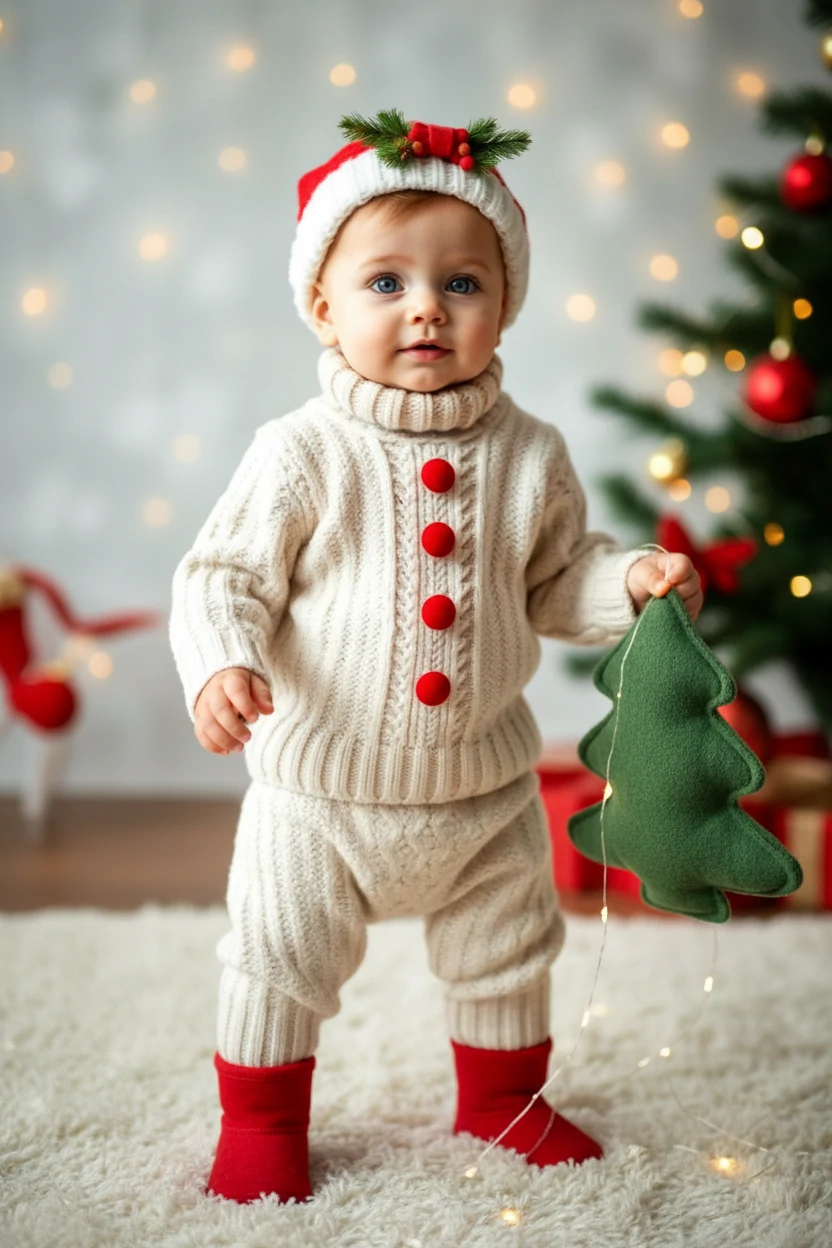
提示词要点
图片里的人物步态不稳,笨拙地向镜头走来,像刚开始学习走路。
查看原始提示词(英文)
The person in the picture exhibits an unsteady gait as they awkwardly approach the camera, reminiscent of a novice walker.
- 更复杂的动作检查
- 原图中的宝宝穿针织服和红袜子站立,走路提示词要求身体移动并改变与地面的接触。宝宝靠近镜头时,请观察双脚和衣服纽扣。
- 按需要调整动作
- 保持全身可见,四肢变形时缩短动作。历史文件为 320 × 480,约 10 秒,不代表当前提供的分辨率选项。
导出前检查完整视频
- 开头、中间和结尾
- 先正常播放一次,再在最大动作附近暂停。比较眼睛、嘴、手指数量、衣服细节和背景边缘。好看的缩略图可能掩盖不理想的最后一帧。
- 保留可用版本
- 再次尝试前,下载想保留的结果,并记下输入、提示词和设置,便于了解变化。重新生成是一次新尝试,可能继续消耗积分。
- 完成发布前的剪辑
- 在视频编辑器里裁掉停顿、拼接片段并添加字幕。用手机预览,确保字幕不挡脸。发布前打开下载文件,试听其音频。
针对实际看到的问题修改
- 面部变化
- 换更清晰的正面原图,减少转头。保持照片和镜头不变,只修改动作要求。
- 手或腿变形
- 原图应包含相关身体部位,减少伸手幅度、转身角度或动作数量。需要特定舞步时,在专用跳舞工具里使用舞蹈参考。
- 背景弯曲或漂移
- 尝试固定镜头和更小动作。镜头与主体同时移动,会要求模型重建更多场景。
- 说出来的话不对
- 需要指定留言时,改用照片加音频流程。反复把台词写进通用动作提示词,并不能构成可靠的对口型流程。
按想做的视频继续学习
制作建议
- 先用眨眼、微笑、挥手等简单动作。动作越复杂,越容易出现变形。
- 让面部在画面中足够清楚,同时保留肩部,减少晃动。
- 选择背景干净、光线充足的照片,更容易得到自然的面部效果。
- 每次只调整一个因素,例如提示词、裁剪或比例,便于比较变化。
- 可以从这段动作提示词开始:“宝宝微笑并轻轻挥一次手,镜头保持不动。”它只是尝试的起点,仍需检查实际结果。
常见问题
哪种方式更适合写实效果?▼
应该选择什么画面比例?▼
为什么面部看起来不稳定或模糊?▼
没有照片也能制作 AI 宝宝视频吗?▼
可以免费制作 AI 宝宝视频吗?▼
这个流程能把成人肖像变成宝宝吗?▼
准备开始制作?
选择自己的素材,生成前检查当前可用设置。