Cartoon-Baby-Generator
Cartoon-Stile sind weniger empfindlich als fotorealistische Ergebnisse. Beginne mit einem klaren Foto und teste zwei bis drei Stile, um den passendsten für das Gesicht des Babys zu finden.
Wandle ein Babyfoto in einen Cartoon für einen konkreten Zweck um: ein Profilbild, eine Geburtstagskarte oder eine Figur für ein späteres Video. Ausschnitt und Stil sollten zu diesem Einsatz passen.
Tool öffnenSchnelle Schritte
Von der Vorbereitung deiner Eingaben bis zur Prüfung des Ergebnisses.
- 1Öffnen Sie das Cartoon-Baby-Tool.
- 2Laden Sie ein klares Babyfoto hoch (ein Gesicht, gute Beleuchtung).
- 3Wählen Sie einen Stil (Anime/Chibi/3D/etc.).
- 4Generieren Sie 2-3 Variationen.
- 5Speichern Sie das beste Ergebnis und verwenden Sie es als Avatar oder Thumbnail wieder.
- Wählen Sie eine Stilvorlage oder schreiben Sie einen benutzerdefinierten Stil-Prompt.
Lege zuerst das Bildformat fest
- Ein erkennbares Profilbild
- Beginne mit Kopf und Schultern im Quadrat 1:1. Lass Platz um die Haare für einen runden Zuschnitt. Chibi oder weiches 3D können auch klein gut lesbar bleiben. Vergleiche Augen, Haaransatz und Lächeln mit dem Foto.
- Karte oder Einladung
- Probiere 2:3 oder 4:5 mit ruhigem Hintergrund und Platz für Namen und Datum. Setze den Text anschließend in einem Layoutprogramm. Aquarell oder Pastelltöne können die Schrift ergänzen, ohne mit ihr zu konkurrieren.
- Sticker oder Figur für ein Video
- Für einen Sticker helfen eine kompakte Pose und klare Konturen. Für einen späteren Ganzkörpertanz sollten Arme, Beine und Füße schon im Foto sichtbar sein. Das Tool erzeugt ein Standbild; ein Stickerstil garantiert weder Transparenz noch Animation.
Vergleiche jeweils einen Stil
Melde dich an und lade ein JPG, PNG oder WebP bis 10 MB hoch. Augen und Mund sollten frei bleiben. Schneide unnötigen Hintergrund vorher weg. Wähle eine sichtbare Vorlage oder öffne Alle Stile anzeigen. Aktuell wird GPT Image 2.5 Flare verwendet; prüfe vor jedem Versuch die angezeigten Credits.
- Vorlagen vergleichen
- Lass das Feld für den eigenen Stil leer und behalte Foto und Seitenverhältnis bei. Erzeuge zwei oder drei Stile in getrennten Versuchen. Wenn du zugleich Foto und Ausschnitt wechselst, lässt sich eine Verbesserung schwer zuordnen.
- Einen eigenen Stil beschreiben
- Eigener Text ersetzt die Beschreibung der gewählten Vorlage. Nenne Zeichenart, Farben und Hintergrund ausdrücklich. Die Vorlage wird nicht zusätzlich angehängt. Leere das Textfeld, wenn du wieder die Vorlage verwenden möchtest.
- Den Versuch nachvollziehbar halten
- Lass Prompt verbessern ausgeschaltet, wenn du deinen genauen Wortlaut vergleichen willst. Eingeschaltet kann die Funktion ihn umformulieren. Sichere Foto und Text außerhalb des Formulars: Beide werden beim Absenden geleert.
Aquarell für eine Karte
Sanfte Aquarellillustration des Babys auf dem Referenzfoto, warme Creme- und dezente Pfirsichtöne, leichte Papierstruktur, heller einfacher Hintergrund mit Platz über dem Kopf, keine Schrift.
Beginne im Hochformat. Setze Namen und Datum später selbst, damit Schreibweise, Schriftart und Position stimmen.
Einfaches Profilporträt
Weiches 3D-Cartoonporträt des Babys auf dem Foto, Frisur und Lächeln erkennbar lassen, Gesicht zentriert, sauberer hellblauer Hintergrund, Platz um den Kopf, keine Requisiten oder Schrift.
Beginne mit 1:1. Das sind Vorschläge zum Ausprobieren, nicht die überlieferten Prompts der Beispiele.
Tutorial-Beispiele (mit Prompts & Einstellungen)
Vergleiche die Beispiele, ihre verfügbaren Eingaben und dokumentierten Einstellungen.
Cartoon-Baby-Stil (Beispiel 1)
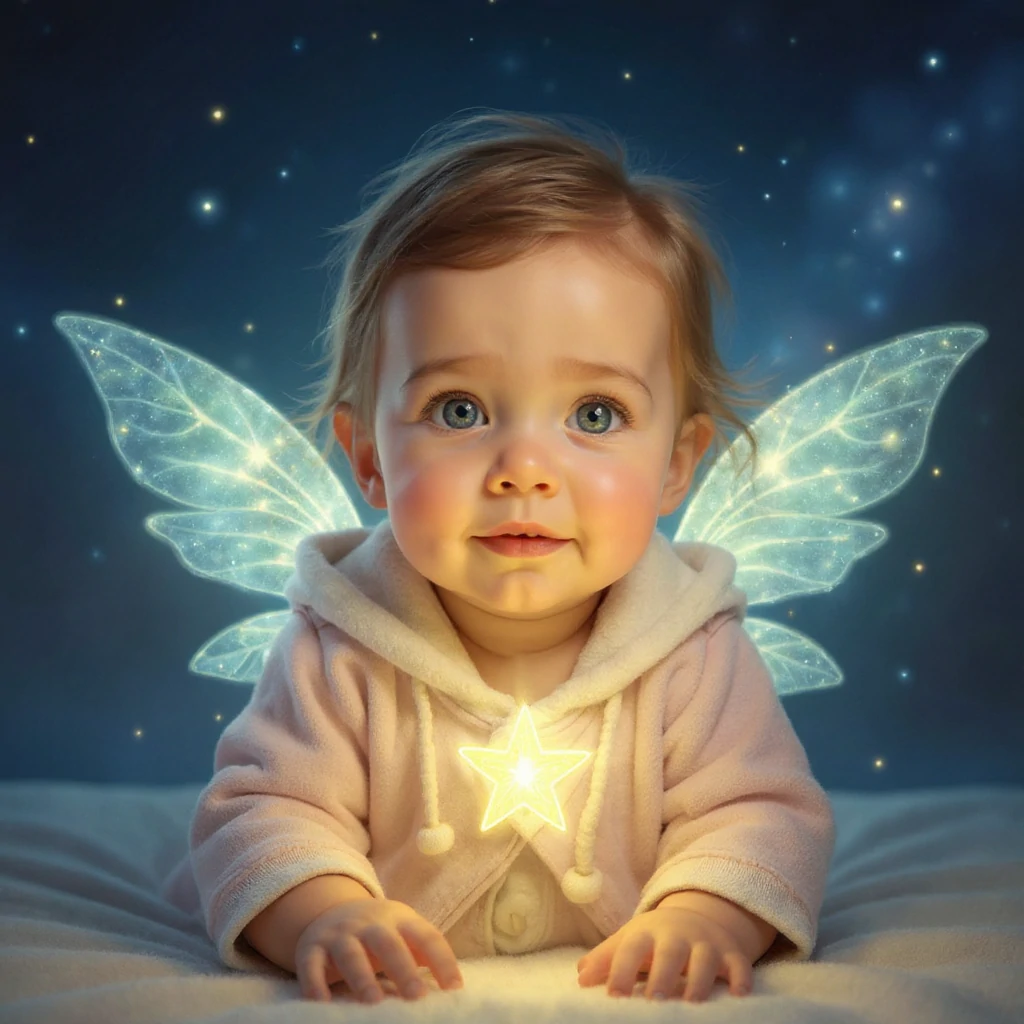
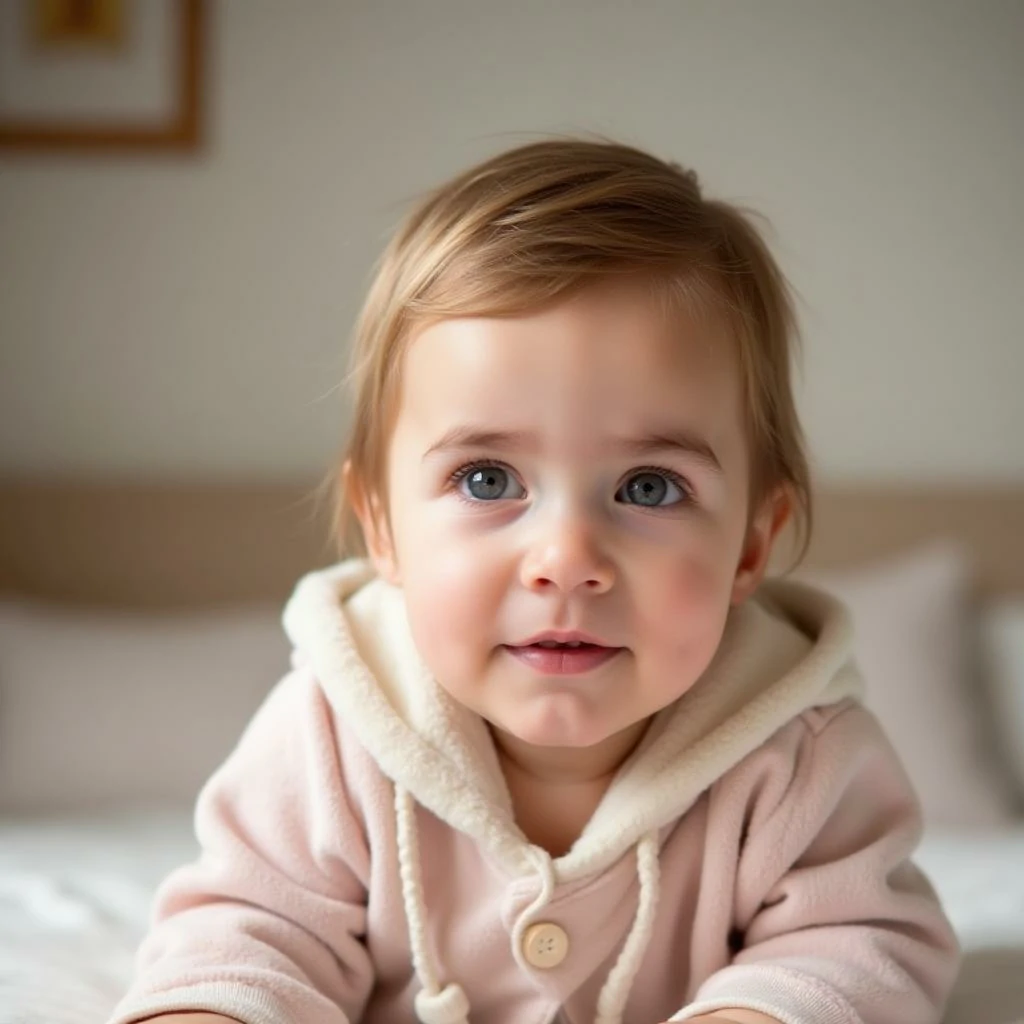
Vergleiche das Ausgangsfoto mit jeder Illustration. Ein Stil verändert die Darstellung und eventuell Gesichtszüge; wähle die passende Variante für Avatar oder Bild.
- Sternenwesen: Licht und Fantasie
- Das hellrosa Kapuzenoutfit bleibt erkennbar. Leuchtende Flügel, ein Stern und ein dunkelblauer Hintergrund verändern die Szene. Vergleiche erst das Gesicht, dann die Flügelkonturen. Ein enger runder Zuschnitt würde einen großen Teil des Effekts verdecken.
Cartoon-Baby-Stil (Beispiel 2)
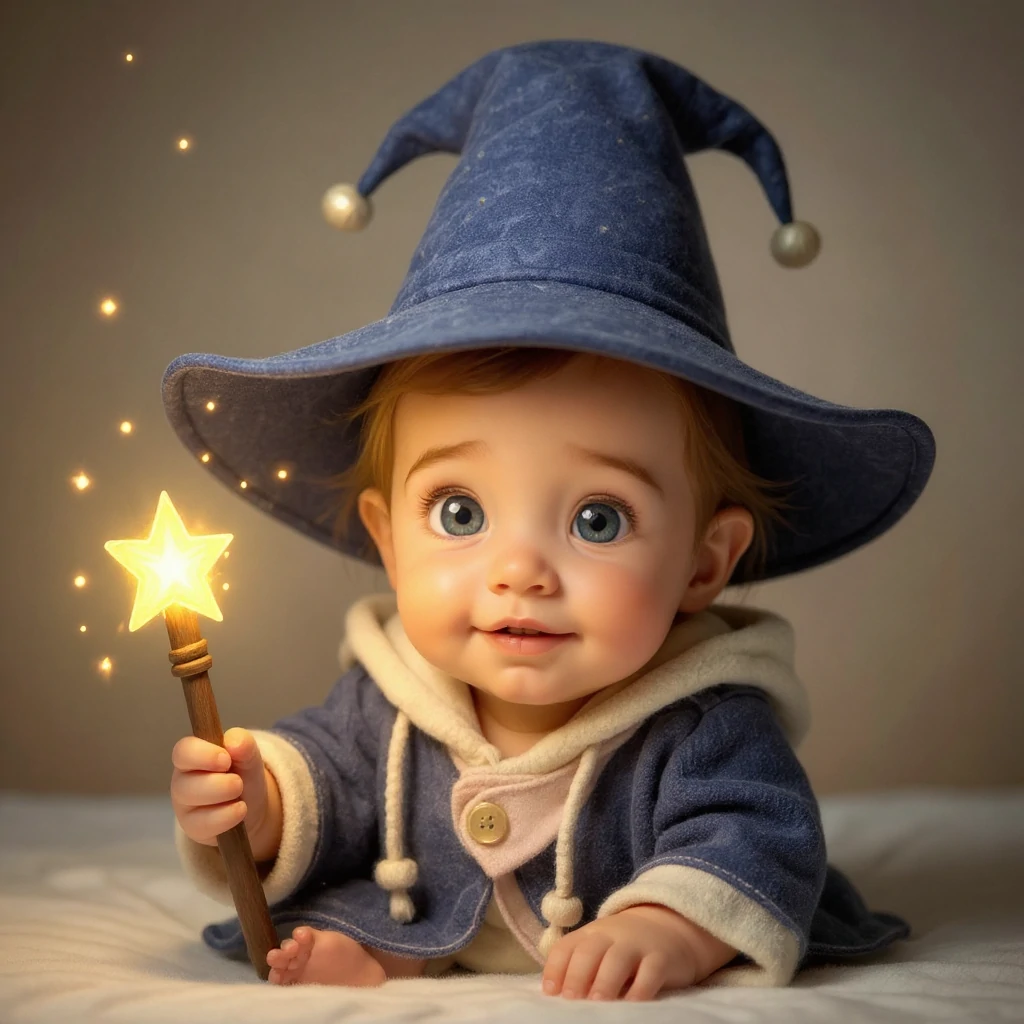
Vergleiche das Ausgangsfoto mit jeder Illustration. Ein Stil verändert die Darstellung und eventuell Gesichtszüge; wähle die passende Variante für Avatar oder Bild.
- Zauberlehrling: neue Kleidung und Pose
- Blauer Hut und Sternenstab erzählen mit demselben Ausgangsfoto eine andere Geschichte. Prüfe die Hand am Stab, die sichtbaren Zehen und den Hutrand. Lass beim Zuschneiden Platz für den Hut; hier ändert sich mehr als nur die Farbe.
Cartoon-Baby-Stil (Beispiel 3)
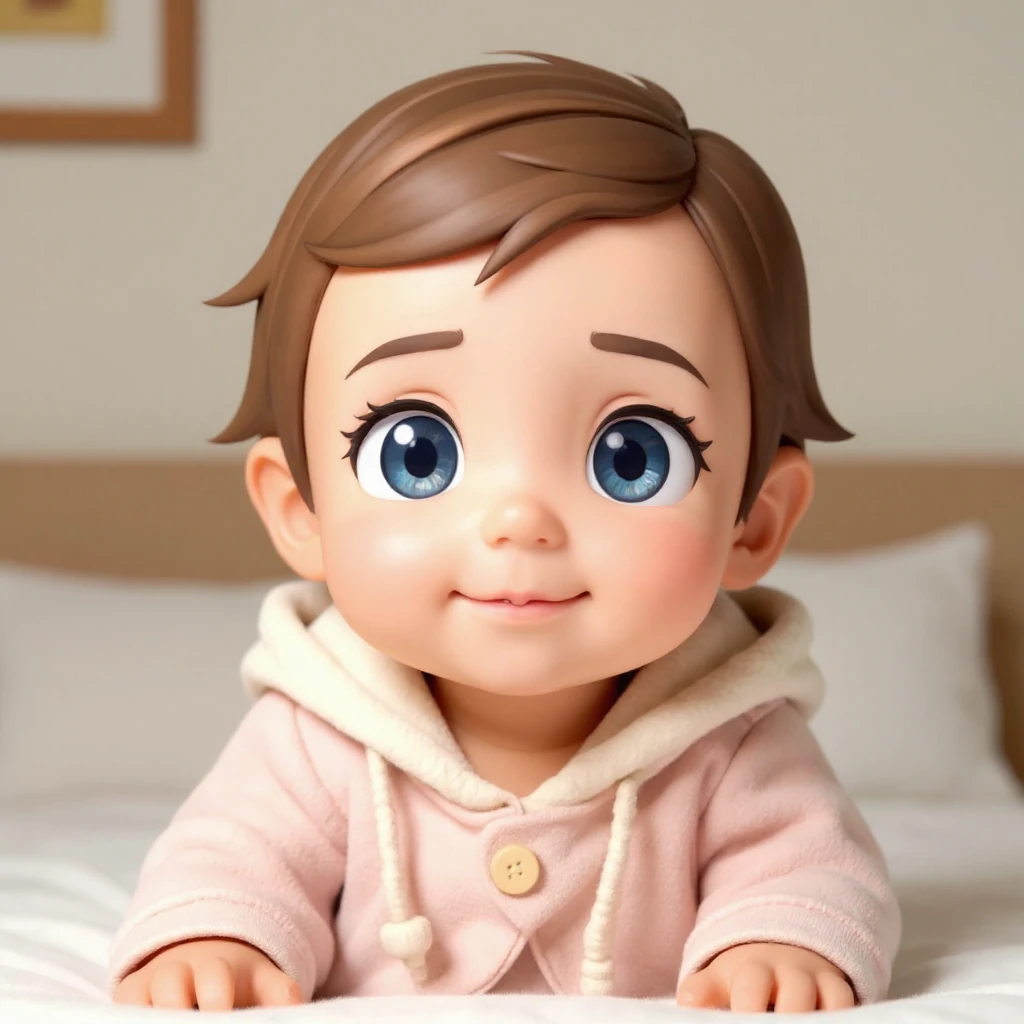
Vergleiche das Ausgangsfoto mit jeder Illustration. Ein Stil verändert die Darstellung und eventuell Gesichtszüge; wähle die passende Variante für Avatar oder Bild.
- Chibi 3D: stärkere Stilisierung
- Rosa Kleidung und Innenraum bleiben näher am Original, während Augen deutlich größer und Haare und Haut glatter werden. Vergleiche dieses kompakte Profilbild mit den Fantasieszenen. Größere Augen bedeuten nicht automatisch mehr Ähnlichkeit.
Prüfe das Bild groß und in seiner späteren Größe
Alle drei Beispiele verwenden dasselbe Ausgangsfoto. Die ursprünglichen Prompts und Modelleinstellungen fehlen. Die Vorschläge oben sind daher Einstiegshilfen und keine Anleitung zur exakten Reproduktion.
- Das Gesicht wirkt austauschbar
- Gehe zum Originalfoto zurück. Wähle einen weniger übertriebenen Stil und beschreibe, dass sichtbare Frisur und Ausdruck erhalten bleiben sollen. Verwandle nicht immer wieder ein bereits erzeugtes Cartoonbild, wenn du die Ähnlichkeit vergleichen willst.
- Hände oder Ränder sehen falsch aus
- Prüfe Finger, Hut und Haare vor dem Hintergrund. Vereinfache den Text, verzichte auf zusätzliche Requisiten oder nutze ein klareres Foto. Verdeckte Körperteile muss das Modell ergänzen.
- Der Ausschnitt schneidet Details ab
- Wähle ein passendes Seitenverhältnis und lass Rand. Prüfe einen kleinen Kreis für das Profilbild und das vollständige Rechteck für die Karte. Sichere das ganze Ergebnis, bevor du es anderswo zuschneidest.
Bereite die Datei für ihren Einsatz vor
Öffne das fertige Ergebnis und lade es herunter. Auch eine PNG-Datei kann einen undurchsichtigen Hintergrund enthalten. Entferne ihn bei Bedarf in einem Bildeditor und kontrolliere Haare und Kleidungskanten. Für Druckkarten zählen die Pixelmaße und Vorgaben der Druckerei; HD allein garantiert keine beliebige Druckgröße.
Bewahre das Original vor dem Hinzufügen von Text oder Rahmen auf. Für Bewegung lädst du das gewählte Bild in einen Videoworkflow und beginnst mit einer kleinen Bewegung. Cartoon Baby exportiert keinen Tanz, kein GIF und kein Video.
- Das Cartoonporträt animieren
Nutze das gespeicherte Bild als Ausgangsfigur.
- Eine Ganzkörperfigur tanzen lassen
Bereite zusätzlich ein Bewegungsvideo vor.
Tipps
- Einfache Hintergründe erzeugen normalerweise sauberere Cartoon-Kanten.
- Versuchen Sie mehrere Stile—einige Gesichter sehen in bestimmten Ästhetiken besser aus.
- Wenn die Ergebnisse unordentlich aussehen, ziehen Sie den Zuschnitt enger, um sich auf das Gesicht zu konzentrieren.
- Beschreibe für einen eigenen Stil Zeichentechnik, Farben und Hintergrund. Vergleiche Stile mit demselben Foto und prüfe vor dem Download Gesicht und Konturen.
FAQ
Kann ich das Ergebnis als Profilbild verwenden?▼
Welches Foto funktioniert am besten?▼
Wie bekomme ich einen konsistenteren Stil?▼
Wird eigener Text mit der Stilvorlage kombiniert?▼
Hat ein Stickerstil einen transparenten Hintergrund?▼
Kann ich mehrere einheitliche Cartoonbilder erstellen?▼
Bereit zum Generieren?
Wähle deine eigenen Eingaben und prüfe vor dem Generieren die verfügbaren Einstellungen.